# SQL Commands Reference
- SQL keywords are NOT case sensitive:
selectis the same asSELECT - Semicolon is the standard way to separate each SQL statement in database systems that allow more than one SQL statement to be executed in the same call to the server.
# Some of The Most Important SQL Commands
SELECT- extracts data from a databaseUPDATE- updates data in a databaseDELETE- deletes data from a databaseINSERT INTO- inserts new data into a databaseCREATE DATABASE- creates a new databaseALTER DATABASE- modifies a databaseCREATE TABLE- creates a new tableALTER TABLE- modifies a tableDROP TABLE- deletes a tableCREATE INDEX- creates an index (search key)DROP INDEX- deletes an index
# SQL SELECT
The SELECT statement is used to select data from a database.
The data returned is stored in a result table, called the result-set.
# SELECT Syntax
SELECT *column1*, *column2, ...*
FROM *table_name*;
Select all:
SELECT * FROM table_name;
# SQL SELECT DISTINCT
is used to return only distinct (different) values
SELECT DISTINCT Country FROM Customers;
Count and return the number of different (distinct) countries in the "Customers" table:
SELECT COUNT(DISTINCT Country) FROM Customers;
COUNT(DISTINCT column_name) is not supported in Microsoft Access databases
# SQL WHERE Clause
to filter records -› only those records that fulfill a specified condition
SELECT column1, column2, ...
FROM table_name
WHERE condition;
The
WHEREclause is not only used inSELECTstatements, it is also used inUPDATE,DELETE, etc.!
SELECT * FROM Customers
WHERE Country='Germany';
# Text Fields vs. Numeric Fields
SQL requires single quotes around text values (most database systems will also allow double quotes).
However, numeric fields should not be enclosed in quotes:
# Operators in The WHERE Clause
The following operators can be used in the WHERE clause:
| Operator | Description |
|---|---|
| = | Equal |
| > | Greater than |
| < | Less than |
| >= | Greater than or equal |
| <= | Less than or equal |
| <> | Not equal. Note: In some versions of SQL this operator may be written as != |
| BETWEEN | Between a certain range |
| LIKE | Search for a pattern |
| IN | To specify multiple possible values for a column |
SELECT * FROM Products
WHERE Price BETWEEN 50 AND 60;
SELECT * FROM Customers
WHERE City LIKE 's%';
SELECT * FROM Customers
WHERE City IN ('Paris','London','Berlin');
# SQL AND, OR and NOT Operators
WHERE can be combined with AND, OR, and NOT operators.
# AND Syntax
SELECT *column1*, *column2, ...*
FROM *table_name*
WHERE *condition1* AND *condition2* AND *condition3 ...*;
# OR Syntax
SELECT *column1*, *column2, ...*
FROM *table_name*
WHERE *condition1* OR *condition2* OR *condition3 ...*;
SELECT * FROM Customers
WHERE City='Berlin' OR City='München';
SELECT * FROM Customers
WHERE Country='Germany' OR Country='Spain';
# NOT Syntax
SELECT *column1*, *column2, ...*
FROM *table_name*
WHERE NOT *condition*;
SELECT * FROM Customers
WHERE NOT Country='Germany';
# Combining AND, OR and NOT
SELECT * FROM Customers
WHERE Country='Germany' AND (City='Berlin' OR City='München');
SELECT * FROM Customers
WHERE NOT Country='Germany' AND NOT Country='USA';
# SQL ORDER BY Keyword
Sort the result-set in ascending or descending order.
SELECT * FROM Customers
ORDER BY Country;
SELECT * FROM Customers
ORDER BY Country DESC;
several columns:
orders by Country, but if some rows have the same Country, it orders them by CustomerName:
SELECT * FROM Customers
ORDER BY Country, CustomerName;
sorted ascending by the "Country" and descending by the "CustomerName" column:
SELECT * FROM Customers
ORDER BY Country ASC, CustomerName DESC;
# SQL INSERT INTO
to insert new records in a table
INSERT INTO table_name (column1, column2, column3, ...)
VALUES (value1, value2, value3, ...);
or ( make sure the order of the values is in the same order as the columns in the table.):
INSERT INTO table_name
VALUES (value1, value2, value3, ...);
INSERT INTO Customers (CustomerName, ContactName, Address, City, PostalCode, Country)
VALUES ('Cardinal', 'Tom B. Erichsen', 'Skagen 21', 'Stavanger', '4006', 'Norway');
The CustomerID column is an auto-increment (opens new window) field and will be generated automatically when a new record is inserted into the table.
# Insert Data Only in Specified Columns
INSERT INTO Customers (CustomerName, City, Country)
VALUES ('Cardinal', 'Stavanger', 'Norway');
# SQL NULL Values
A field with a NULL value is one that has been left blank during record creation!
# How to Test for NULL Values?
use the IS NULL and IS NOT NULL operators
SELECT column_names
FROM table_name
WHERE column_name IS NULL;
SELECT column_names
FROM table_name
WHERE column_name IS NOT NULL;
examples:
SELECT CustomerName, ContactName, Address
FROM Customers
WHERE Address IS NULL;
SELECT CustomerName, ContactName, Address
FROM Customers
WHERE Address IS NOT NULL;
# SQL UPDATE
UPDATE *table_name*
SET *column1* = *value1*, *column2* = *value2*, ...
WHERE *condition*;
be carefull!! alway use where - otherwise all records will be updated
UPDATE Customers
SET ContactName = 'Alfred Schmidt', City= 'Frankfurt'
WHERE CustomerID = 1;
# UPDATE Multiple Records
UPDATE Customers
SET ContactName='Juan'
WHERE Country='Mexico';
# SQL DELETE
DELETE FROM table_name WHERE condition;
DELETE FROM Customers WHERE CustomerName='Alfreds Futterkiste';
# Delete All Records
Be careful when deleting records in a table! If you omit the
WHEREclause, all records in the table will be deleted!
DELETE FROM Customers;
# SQL SELECT TOP / LIMIT
MySQL Syntax:
SELECT column_name(s)
FROM table_name
WHERE condition
LIMIT number;
Not all database systems support
LIMIT. SQL Server / MS Access support the ``SELECT TOPclause to select a limited number of records, while Oracle usesFETCH FIRST n ROWS ONLYandROWNUM`.
SELECT * FROM Customers
LIMIT 3;
SELECT * FROM Customers
WHERE Country='Germany'
LIMIT 3;
# SQL MIN() and MAX()
The MIN() function returns the smallest value of the selected column.
SELECT MIN(column_name)
FROM table_name
WHERE condition;
SELECT MIN(Price) AS SmallestPrice
FROM Products;
The MAX() function returns the largest value of the selected column.
SELECT MAX(column_name)
FROM table_name
WHERE condition;
SELECT MAX(Price) AS LargestPrice
FROM Products;
# SQL COUNT(), AVG() and SUM()
# COUNT()
returns the number of rows that matches a specified criterion
SELECT COUNT(column_name)
FROM table_name
WHERE condition;
SELECT COUNT(ProductID)
FROM Products;
# AVG()
returns the average value of a numeric column.
SELECT AVG(column_name)
FROM table_name
WHERE condition;
SELECT AVG(Price)
FROM Products;
# SUM()
returns the total sum of a numeric column.
SELECT SUM(column_name)
FROM table_name
WHERE condition;
SELECT SUM(Quantity)
FROM OrderDetails;
Note: NULL values are ignored.
# SQL LIKE
Is used in a WHERE clause to search for a specified pattern
wildcards often used in conjunction with the LIKE operator:
- The percent sign (%) represents zero, one, or multiple characters
- The underscore sign (_) represents one, single character
MS Access uses an asterisk (*) instead of the percent sign (%), and a question mark (?) instead of the underscore (_).
SELECT column1, column2, ...
FROM table_name
WHERE columnN LIKE pattern;
You can also combine any number of conditions using AND or OR operators.
| LIKE Operator | Description |
|---|---|
WHERE CustomerName LIKE 'a%' | Finds any values that start with "a" |
WHERE CustomerName LIKE '%a' | Finds any values that end with "a" |
WHERE CustomerName LIKE '%or%' | Finds any values that have "or" in any position |
WHERE CustomerName LIKE '_r%' | Finds any values that have "r" in the second position |
WHERE CustomerName LIKE 'a_%' | Finds any values that start with "a" and are at least 2 characters in length |
WHERE CustomerName LIKE 'a__%' | Finds any values that start with "a" and are at least 3 characters in length |
WHERE ContactName LIKE 'a%o' | Finds any values that start with "a" and ends with "o" |
WHERE CustomerName NOT LIKE 'a%'; | Finds any values that that do NOT start with "a" |
# Examples
SELECT * FROM Customers
WHERE City LIKE 'ber%';
SELECT * FROM Customers
WHERE City LIKE '%es%';
SELECT * FROM Customers
WHERE City LIKE '_ondon';
SELECT * FROM Customers
WHERE City LIKE 'L_n_on';
MS Access offers more Wildcatds than MySQL
# SQL IN
A shorthand for multiple OR conditions - allows you to specify multiple values in a WHERE clause.
SELECT column_name(s)
FROM table_name
WHERE column_name IN (value1, value2, ...);
or
SELECT column_name(s)
FROM table_name
WHERE column_name IN (SELECT STATEMENT);
SELECT * FROM Customers
WHERE Country IN ('Germany', 'France', 'UK');
SELECT * FROM Customers
WHERE Country NOT IN ('Germany', 'France', 'UK');
selects all customers that are from the same countries as the suppliers:
SELECT * FROM Customers
WHERE Country IN (SELECT Country FROM Suppliers);
# SQL BETWEEN
selects values within a given range.
- values can be numbers, text, or dates
- is inclusive: begin and end values are included
SELECT column_name(s)
FROM table_name
WHERE column_name BETWEEN value1 AND value2;
SELECT * FROM Products
WHERE Price BETWEEN 10 AND 20;
SELECT * FROM Products
WHERE Price NOT BETWEEN 10 AND 20;
SELECT * FROM Products
WHERE Price BETWEEN 10 AND 20
AND CategoryID NOT IN (1,2,3);
SELECT * FROM Products
WHERE ProductName BETWEEN 'C%' AND 'N%'
ORDER BY ProductName;
SELECT * FROM Products
WHERE ProductName NOT BETWEEN 'Carnarvon Tigers' AND 'Mozzarella di Giovanni'
ORDER BY ProductName;
SELECT * FROM Orders
WHERE OrderDate BETWEEN #07/01/1996# AND #07/31/1996#;
SELECT * FROM Orders
WHERE OrderDate BETWEEN '1996-07-01' AND '1996-07-31';
# SQL Aliases
To give a table, or a column in a table, a temporary name.
- often used to make column names more readable.
- only exists for the duration of that query.
- created with the
ASkeyword.
# Column Syntax
SELECT column_name AS alias_name
FROM table_name;
# Table Syntax
SELECT column_name(s)
FROM table_name AS alias_name;
SELECT CustomerID AS ID, CustomerName AS Customer
FROM Customers;
Note: It requires double quotation marks or square brackets if the alias name contains spaces:
SELECT CustomerName AS Customer, ContactName AS [Contact Person]
FROM Customers;
or
SELECT CustomerName AS Customer, ContactName AS 'Contact Person'
FROM Customers;
or
SELECT CustomerName AS Customer, ContactName AS "Contact Person"
FROM Customers;
# CONCAT (MySQL)
This creates an alias named "Address" that combines four columns (Address, PostalCode, City and Country):
SELECT CustomerName, CONCAT(Address,', ',PostalCode,', ',City,', ',Country) AS Address
FROM Customers;
other DBs:
SELECT CustomerName, Address + ', ' + PostalCode + ' ' + City + ', ' + Country AS Address
FROM Customers;
result:
| CustomerName | Address |
|---|---|
| Alfreds Futterkiste | Obere Str. 57, 12209 Berlin, Germany |
| Ana Trujillo Emparedados y helados | Avda. de la Constitución 2222, 05021 México D.F., Mexico |
| Antonio Moreno Taquería | Mataderos 2312, 05023 México D.F., Mexico |
| ... |
# CONCAT_WS (MySQL)
adds a seperator (eg ", ")
SELECT CustomerName, CONCAT_WS(', ', Address, PostalCode, City, Country) AS Address
FROM Customers;
# Alias for Tables Example
SELECT o.OrderID, o.OrderDate, c.CustomerName
FROM Customers AS c, Orders AS o
WHERE c.CustomerName='Around the Horn' AND c.CustomerID=o.CustomerID;
We use the "Customers" and "Orders" tables, and give them the table aliases of "c" and "o" respectively (Here we use aliases to make the SQL shorter)
This is the same as above, but without aliases:
SELECT Orders.OrderID, Orders.OrderDate, Customers.CustomerName
FROM Customers, Orders
WHERE Customers.CustomerName='Around the Horn' AND Customers.CustomerID=Orders.CustomerID;
Aliases can be useful when:
- There are more than one table involved in a query
- Functions are used in the query
- Column names are big or not very readable
- Two or more columns are combined together
# SQL Joins
is used to combine rows from two or more tables, based on a related column between them.
(INNER) JOIN: Returns records that have matching values in both tablesLEFT (OUTER) JOIN: Returns all records from the left table, and the matched records from the right tableRIGHT (OUTER) JOIN: Returns all records from the right table, and the matched records from the left tableFULL (OUTER) JOIN: Returns all records when there is a match in either left or right table
# SQL INNER JOIN
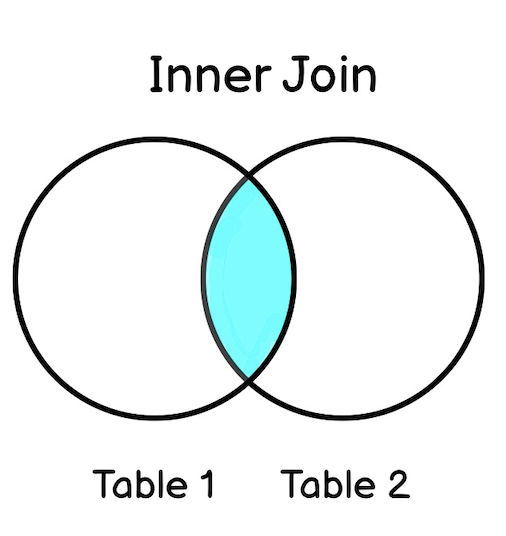
Selects records that have matching values in both tables.
SELECT column_name(s)
FROM table1
INNER JOIN table2
ON table1.column_name = table2.column_name;
SELECT Orders.OrderID, Customers.CustomerName, Orders.OrderDate
FROM Orders
INNER JOIN Customers ON Orders.CustomerID=Customers.CustomerID;
Note: The
INNER JOINkeyword selects all rows from both tables as long as there is a match between the columns. If there are records in the "Orders" table that do not have matches in "Customers", these orders will not be shown!
# JOIN Three Tables
SELECT Orders.OrderID, Customers.CustomerName, Shippers.ShipperName
FROM ((Orders
INNER JOIN Customers ON Orders.CustomerID = Customers.CustomerID)
INNER JOIN Shippers ON Orders.ShipperID = Shippers.ShipperID);
SELECT Orders.OrderID, Customers.CustomerName, Shippers.ShipperName
FROM (
	(
		Orders INNER JOIN Customers ON Orders.CustomerID = Customers.CustomerID
	)
	INNER JOIN Shippers ON Orders.ShipperID = Shippers.ShipperID
);
# SQL LEFT JOIN
returns all records from the left table (table1), and the matching records from the right table (table2).
SELECT column_name(s)
FROM table1
LEFT JOIN table2
ON table1.column_name = table2.column_name;
Note: In some databases LEFT JOIN is called LEFT OUTER JOIN.
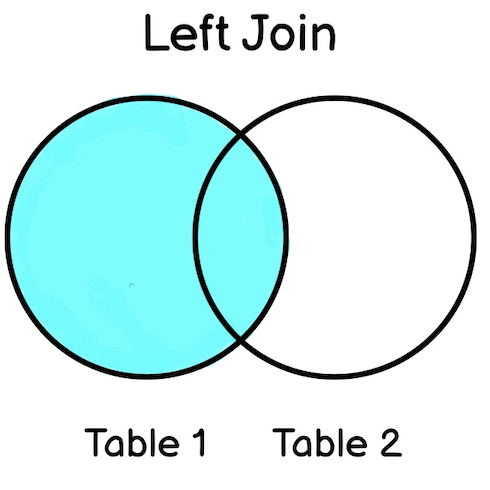
This will select all customers, and any orders they might have:
SELECT Customers.CustomerName, Orders.OrderID
FROM Customers
LEFT JOIN Orders ON Customers.CustomerID = Orders.CustomerID
ORDER BY Customers.CustomerName;
Note: The
LEFT JOINkeyword returns all records from the left table (Customers), even if there are no matches in the right table (Orders).
# SQL RIGHT JOIN
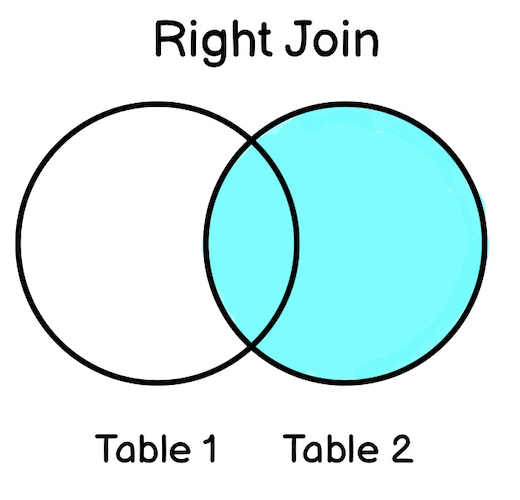
returns all records from the right table (table2), and the matching records from the left table (table1).
SELECT column_name(s)
FROM table1
RIGHT JOIN table2
ON table1.column_name = table2.column_name;
Note: In some databases
RIGHT JOINis calledRIGHT OUTER JOIN.
SELECT Orders.OrderID, Employees.LastName, Employees.FirstName
FROM Orders
RIGHT JOIN Employees ON Orders.EmployeeID = Employees.EmployeeID
ORDER BY Orders.OrderID;
# SQL CROSS JOIN (MySQL)
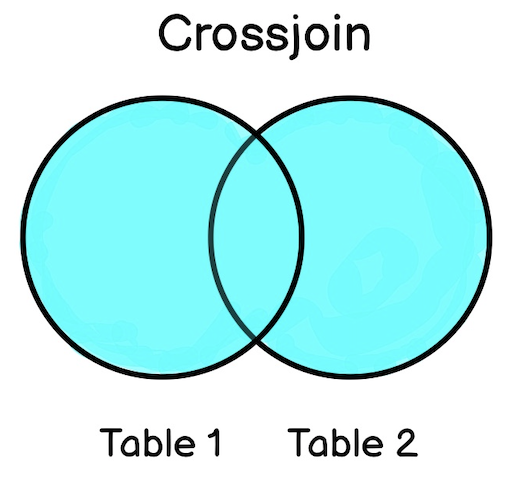
Returns all records from both tables (table1 and table2).
SELECT column_name(s)
FROM table1
CROSS JOIN table2;
Note:
CROSS JOINcan potentially return very large result-sets!
SELECT Customers.CustomerName, Orders.OrderID
FROM Customers
CROSS JOIN Orders;
If you add a
WHEREclause (if table1 and table2 has a relationship), theCROSS JOINwill produce the same result as theINNER JOINclause:
SELECT Customers.CustomerName, Orders.OrderID
FROM Customers
CROSS JOIN Orders
WHERE Customers.CustomerID=Orders.CustomerID;
# SQL Self Join
the table is joined with itself.
SELECT column_name(s)
FROM table1 T1, table1 T2
WHERE condition;
T1 and T2 are different table aliases for the same table.
SELECT A.CustomerName AS CustomerName1, B.CustomerName AS CustomerName2, A.City
FROM Customers A, Customers B
WHERE A.CustomerID <> B.CustomerID
AND A.City = B.City
ORDER BY A.City;
# SQL UNION Operator
To combine the result-set of two or more SELECT statements.
- Every
SELECTstatement withinUNIONmust have the same number of columns - The columns must also have similar data types
- The columns in every
SELECTstatement must also be in the same order
SELECT column_name(s) FROM table1
UNION
SELECT column_name(s) FROM table2;
To allow duplicate values, use UNION ALL:
SELECT column_name(s) FROM table1
UNION ALL
SELECT column_name(s) FROM table2;
SELECT City FROM Customers
UNION
SELECT City FROM Suppliers
ORDER BY City;
If some customers or suppliers have the same city, each city will only be listed once, because
UNIONselects only distinct values.
SELECT City FROM Customers
UNION ALL
SELECT City FROM Suppliers
ORDER BY City;
with WHERE:
SELECT City, Country FROM Customers
WHERE Country='Germany'
UNION
SELECT City, Country FROM Suppliers
WHERE Country='Germany'
ORDER BY City;
SELECT 'Customer' AS Type, ContactName, City, Country
FROM Customers
UNION
SELECT 'Supplier', ContactName, City, Country
FROM Suppliers
Notice the "AS Type" above - it is an alias. SQL Aliases (opens new window) are used to give a table or a column a temporary name. An alias only exists for the duration of the query. So, here we have created a temporary column named "Type", that list whether the contact person is a "Customer" or a "Supplier".
# SQL GROUP BY
groups rows that have the same values into summary rows, like "find the number of customers in each country".
often used with aggregate functions (COUNT(), MAX(), MIN(), SUM(), AVG()) to group the result-set by one or more columns.
SELECT column_name(s)
FROM table_name
WHERE condition
GROUP BY column_name(s)
ORDER BY column_name(s);
number of customers in each country:
SELECT COUNT(CustomerID), Country
FROM Customers
GROUP BY Country;
number of customers in each country, sorted high to low:
SELECT COUNT(CustomerID), Country
FROM Customers
GROUP BY Country
ORDER BY COUNT(CustomerID) DESC;
# GROUP BY With JOIN
SELECT Shippers.ShipperName, COUNT(Orders.OrderID) AS NumberOfOrders FROM Orders
LEFT JOIN Shippers ON Orders.ShipperID = Shippers.ShipperID
GROUP BY ShipperName;
# SQL HAVING
was added to SQL because the WHERE keyword cannot be used with aggregate functions.
SELECT column_name(s)
FROM table_name
WHERE condition
GROUP BY column_name(s)
HAVING condition
ORDER BY column_name(s);
lists the number of customers in each country. Only include countries with more than 5 customers:
SELECT COUNT(CustomerID), Country
FROM Customers
GROUP BY Country
HAVING COUNT(CustomerID) > 5;
lists the employees that have registered more than 10 orders:
SELECT Employees.LastName, COUNT(Orders.OrderID) AS NumberOfOrders
FROM (Orders
INNER JOIN Employees ON Orders.EmployeeID = Employees.EmployeeID)
GROUP BY LastName
HAVING COUNT(Orders.OrderID) > 10;
lists if the employees "Davolio" or "Fuller" have registered more than 25 orders:
SELECT Employees.LastName, COUNT(Orders.OrderID) AS NumberOfOrders
FROM Orders
INNER JOIN Employees ON Orders.EmployeeID = Employees.EmployeeID
WHERE LastName = 'Davolio' OR LastName = 'Fuller'
GROUP BY LastName
HAVING COUNT(Orders.OrderID) > 25;
# SQL EXISTS
to test for the existence of any record in a subquery
-› returns TRUE if the subquery returns one or more record
SELECT column_name(s)
FROM table_name
WHERE EXISTS
(SELECT column_name FROM table_name WHERE condition);
SELECT SupplierName
FROM Suppliers
WHERE EXISTS (SELECT ProductName FROM Products WHERE Products.SupplierID = Suppliers.supplierID AND Price < 20);
returns TRUE and lists the suppliers with a product price less than 20
SELECT SupplierName
FROM Suppliers
WHERE EXISTS (SELECT ProductName FROM Products WHERE Products.SupplierID = Suppliers.supplierID AND Price = 22);
# SQL ANY and ALL
allow you to perform a comparison between a single column value and a range of other values
# SQL ANY
- returns a boolean value as a result
- returns TRUE if ANY of the subquery values meet the condition
condition will be true if the operation is true for any of the values in the range.
SELECT column_name(s)
FROM table_name
WHERE column_name operator ANY
  (SELECT column_name
  FROM table_name
  WHERE condition);
Note: The operator must be a standard comparison operator (=, <>, !=, >, >=, <, or <=)
# Examples
lists the ProductName if it finds ANY records in the OrderDetails table has Quantity equal to 10 (this will return TRUE because the Quantity column has some values of 10):
SELECT ProductName
FROM Products
WHERE ProductID = ANY (SELECT ProductID FROM OrderDetails WHERE Quantity = 10);
lists the ProductName if it finds ANY records in the OrderDetails table has Quantity larger than 99
SELECT ProductName
FROM Products
WHERE ProductID = ANY
  (SELECT ProductID
  FROM OrderDetails
  WHERE Quantity > 99);
# SQL ALL
- returns a boolean value as a result
- returns TRUE if ALL of the subquery values meet the condition
- is used with
SELECT,WHEREandHAVINGstatements
will be true only if the operation is true for all values in the range.
SELECT ALL column_name(s)
FROM table_name
WHERE condition;
# Syntax With WHERE or HAVING
SELECT column_name(s)
FROM table_name
WHERE column_name operator ALL
  (SELECT column_name
  FROM table_name
  WHERE condition);
# Examples
SELECT ALL ProductName
FROM Products
WHERE TRUE;
SELECT ProductName
FROM Products
WHERE ProductID = ALL
  (SELECT ProductID
  FROM OrderDetails
  WHERE Quantity = 10);
# MySQL INSERT INTO SELECT
check SELECT INTO (opens new window) for other DBs
copies data from one table and inserts it into another table.
requires that the data types in source and target tables matches
Copy all columns
INSERT INTO table2
SELECT * FROM table1
WHERE condition;
Copy only some columns
INSERT INTO table2 (column1, column2, column3, ...)
SELECT column1, column2, column3, ...
FROM table1
WHERE condition;
copy "Suppliers" into "Customers" (the columns that are not filled with data, will contain NULL):
INSERT INTO Customers (CustomerName, City, Country)
SELECT SupplierName, City, Country FROM Suppliers;
copies only the German suppliers into "Customers":
INSERT INTO Customers (CustomerName, City, Country)
SELECT SupplierName, City, Country FROM Suppliers
WHERE Country='Germany';
# SQL CASE
goes through conditions and returns a value when the first condition is met (like an if-then-else statement). So, once a condition is true, it will stop reading and return the result. If no conditions are true, it returns the value in the ELSE clause.
If there is no ELSE part and no conditions are true, it returns NULL.
CASE
    WHEN condition1 THEN result1
    WHEN condition2 THEN result2
    WHEN conditionN THEN resultN
    ELSE result
END;
SELECT OrderID, Quantity,
CASE
    WHEN Quantity > 30 THEN 'The quantity is greater than 30'
    WHEN Quantity = 30 THEN 'The quantity is 30'
    ELSE 'The quantity is under 30'
END AS QuantityText
FROM OrderDetails;
order the customers by City. However, if City is NULL, then order by Country:
SELECT CustomerName, City, Country
FROM Customers
ORDER BY
(CASE
    WHEN City IS NULL THEN Country
    ELSE City
END);
# MySQL IFNULL() and COALESCE()
# IFNULL() - Function
lets you return an alternative value if an expression is NULL. ()
SELECT ProductName, UnitPrice * (UnitsInStock + IFNULL(UnitsOnOrder, 0))
FROM Products;
otherwise the result would be NULL
behaves different in differen DBs
or use
# COALESCE() Function
SELECT ProductName, UnitPrice * (UnitsInStock + COALESCE(UnitsOnOrder, 0))
FROM Products;
# SQL Stored Procedures
prepared SQL code that you can save, so the code can be reused over and over again
You can also pass parameters to a stored procedure, so that the stored procedure can act based on the parameter value(s) that is passed.
CREATE PROCEDURE *procedure_name*
AS
*sql_statement*
GO;
execute
EXEC procedure_name;
--
Example
CREATE PROCEDURE SelectAllCustomers
AS
SELECT * FROM Customers
GO;
EXEC SelectAllCustomers;
--
CREATE PROCEDURE SelectAllCustomers @City nvarchar(30)
AS
SELECT * FROM Customers WHERE City = @City
GO;
EXEC SelectAllCustomers @City = 'London';
--
CREATE PROCEDURE SelectAllCustomers @City nvarchar(30), @PostalCode nvarchar(10)
AS
SELECT * FROM Customers WHERE City = @City AND PostalCode = @PostalCode
GO;
EXEC SelectAllCustomers @City = 'London', @PostalCode = 'WA1 1DP';
# SQL Comments
Comments are not supported in Microsoft Access databases
# Single line comments
start with --
-- Select all:
SELECT * FROM Customers;
SELECT * FROM Customers -- WHERE City='Berlin';
# Multi-line Comments
Multi-line comments start with /* and end with */.
/*Select all the columns
of all the records
in the Customers table:*/
SELECT * FROM Customers;
/*SELECT * FROM Customers;
SELECT * FROM Products;
SELECT * FROM Orders;
SELECT * FROM Categories;*/
SELECT * FROM Suppliers;
SELECT CustomerName, /*City,*/ Country FROM Customers;
SELECT * FROM Customers WHERE (CustomerName LIKE 'L%'
OR CustomerName LIKE 'R%' /*OR CustomerName LIKE 'S%'
OR CustomerName LIKE 'T%'*/ OR CustomerName LIKE 'W%')
AND Country='USA'
ORDER BY CustomerName;