# Functions
https://developer.mozilla.org/en-US/docs/Web/JavaScript/Guide/Functions (opens new window)
# Function Declaration
# A) Function Statement
A function statement has a name. The declaration consists of:
- The function keyword
- The name of the function, or its identifier, followed by parentheses.
- A function body,enclosed in the function’s curly brackets { }
function greetWorld() {
  console.log('Hello, World!');
}

greetWorld();  // -> calling the Function
# B) Function Expressions - Anonymus
- Another way to define a function - (anonymous function)
- often stored in a variable in order to refer to it
- name is usually omitted
- it is common practice to use const as the keyword to declare the variable
- Unlike function declarations, function expressions are not hoisted so they cannot be called before they are defined.
- for debugging: you don't see the function-name in the console as part of the error message if it is an anonomys function
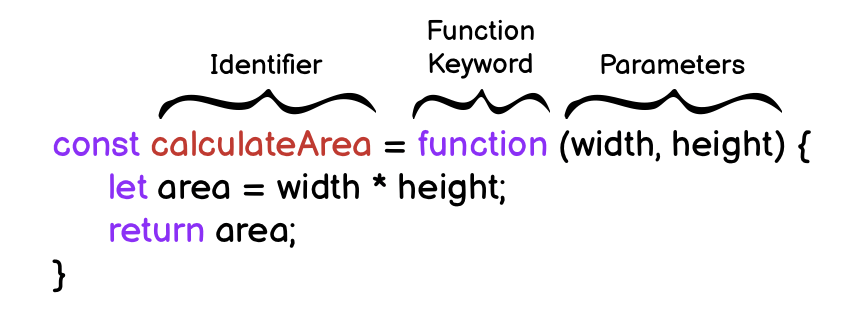
const rectangleArea = function (width, height)  {
  let area = width * height;
  return area;
}
# C) Arrow Functions
MDN Arrow Functions (opens new window)
- ES6 introduced.
- removes the need to type out the keyword
function - Instead, you first include the parameters inside the ( ) and then add an arrow => that points to the function body surrounded in { } like this:
const rectangleArea = (width, height) => {
  let area = width * height;
  return area;
};
difference between arrow function and regular function:
thisrefers to the same content inside of them as outside of them
# D) Concise Body Arrow Functions
The most condensed form to refactor arrow function syntax is concise body.
Functions that take only a single parameter do not need parentheses. If a function takes zero or multiple parameters, parentheses are required.
// ZERO PARAMETERS
const functionName = () => {...};

// ONE PARAMETER
const functionName = paramOne => {...};

// TWO OR MORE PARAMETERS
const functionName = (paramOne, paramTwo) => {...};
function body composed of a single-line block does not need curly braces. Whatever that line evaluates will be automatically returned. The contents of the block should immediately follow the arrow => and the return keyword can be removed. This is referred to as implicit return.
// SINGLE-LINE BLOCK
const sumNumbers = number => number + number;

// MULTI-LINE BLOCK
const sumNumbers = number => {
  return number + number;
}
Examples:
const getFive = () => 5
const addFive = a => a + 5
const divide = (a, b) => a / b
const dayIsWednesday = day => day === 'Wednesday' ? true : false;

const circleArea = radius => Math.PI * radius * radius;

const doubler = item => item * 2;

const multiplier = (item, multi) => item * multi;
multiplier(5, 3); // returns 15
also with more complex teranry expressions:
const getWinner = (cChoice, pChoice) =>
  cChoice === pChoice
    ? RESULT_DRAW
    : (cChoice === ROCK && pChoice === PAPER) ||
      (cChoice === PAPER && pChoice === SCISSORS) ||
      (cChoice === SCISSORS && pChoice === ROCK)
    ? RESULT_PLAYER_WINS
    : RESULT_COMPUTER_WINS;
# Arrow Functions Overview
1) Default syntax:
const add = (a, b) => {
  const result = a + b;
  return result;
}
// like in "normal" functions, parameters and return statement are OPTIONAL!};
No function keyword, parentheses around parameters/ arguments
2) Shorter parameter syntax, if exactly one parameter is received:
const log = message => { console.log(message) };
// could also return something of course - this example just doesn't};
Parentheses around parameter list can be omitted (for exactly one argument).
3) Empty parameter parentheses if NO arguments are received:
const greet = () => {console.log('Hi there!')};
Noteworthy: Parentheses have to be added (can't be omitted)
4) Shorter function body, if exactly one expression is used:
const add = (a, b) => a + b;
Curly braces and return statement can be omitted, expression result is always returned automatically
5) Function returns an object:
const loadPerson = pName => ({name: pName });
Extra parentheses are required around the object, the curly braces would otherwise be interpreted as the function body!
# Parameters & Arguments
Parameters allow functions to accept input(s) and perform a task using the input(s)
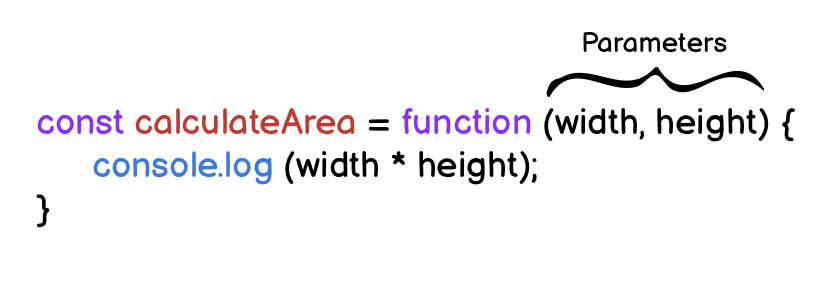
Arguments are the values that are passed to the function when it is called.
- Functions should not be used for input/output -> recieves parameter - returns output
- Function should be as simple as possible (ONE task)

# Hoisting
allows access to function declarations before they’re defined. Hoisting is NOT considered good practice
console.log(greetWorld()); // Output: Hello, World!

  function greetWorld() {
    console.log('Hello, World!');
  }
# Default Parameters
MDN: Default parameters (opens new window)
To have a default/fallback value if no argument passed or if the argument is undefined.
function greeting (name = 'stranger') {
  console.log(`Hello, ${name}!`)
}

greeting('Nick') // Output: Hello, Nick!
greeting() // Output: Hello, stranger!
Old Syntax:
name = name || "Default Value"
//But 0 is also undefined -> new Syntax is better!!
function add(a, b = 0) {
  return a + b
}

// is the same as
const add = (a, b = 0) => a + b

// is the same as
function add(a, b) {
  b = b === undefined ? 0 : b
  return a + b
}
good practice to put them last -› if you dont pass an argument, the default value will be applied
you can also refer to one of the arguments that came before:
const winner = (cChoice, pChoice = cChoice === 'ROCK' ? PAPER : DEFAULT_USER_CHOICE) => {...}
# Return
- Return keyword followed by the value
- By default that resulting value is
undefined. - When a return statement is used in a function body, the execution of the function is stopped and the code that follows it will not be executed.
function rectangleArea(width, height) {
  if (width < 0 || height < 0) {
    return 'You need positive integers to calculate area!';
  }
  return width * height;
}
# Returning Boolean Values from Functions:
if (a === b) { return true } else { return false };
// can be simplified as:
return a === b;
- g else, eg the browser event-listener
- you can use any name, ofthe
cbis used
const sumUp = (resultHandler, ...numbers) => { // resultHandler is the callback
  let sum = 0;
  for (const num of numbers) {
    sum += validateNumber(num);
  }

  resultHandler(sum);
};

const showResult = (result) => {
  alert('The result after adding all numbers is: ' + result);
};

sumUp(showResult, 1, 5, -3, 6, 10);
# Callback Functions
pass a function as the parameter to another function -› a pointer to a function
a lot of the build-in functions use theese
either in-place or stored in a variable
you never call the function, called by somthing else, eg the browser event-listener
you can use any name, ofthe
cbis used
const sumUp = (resultHandler, ...numbers) => { // resultHandler is the callback
  let sum = 0;
  for (const num of numbers) {
    sum += validateNumber(num);
  }

  resultHandler(sum);
};

const showResult = (result) => {
  alert('The result after adding all numbers is: ' + result);
};

sumUp(showResult, 1, 5, -3, 6, 10);
# bind()
functions are objects, and the have special methods attached
const combine = (resultHandler, operation, ...numbers) => {
  let sum = 0;
  for (const num of numbers) {
    if (operation === 'ADD') {
      sum += validateNumber(num);
    } else {
      sum -= validateNumber(num);
    }
  }
  resultHandler(sum);
};

const showResult = (messageText, result) => {
  alert(messageText + ' ' + result);
};

combine(
  showResult.bind(this, 'The result after adding is:'),
  'ADD',
  1,
  5
);

combine(
  showResult.bind(this, 'The result after subtracting is:'),
  'SUBTRACT',
  1,
  5
);
bind will create a new function-reference, that has the provided arguments
-› prepared for a future execution
takes two arguments - first this and then the arguments
function calculate(operation) {
  const enteredNumber = getUserNumberInput();
  const initialResult = currentResult;
  let operator;
  if (operation === 'ADD') {
    currentResult += enteredNumber;
    operator = '+';
  } else if (operation === 'SUBTRACT') {
    currentResult -= enteredNumber;
    operator = '-';
  } else if (operation === 'MULTIPLY') {
    currentResult *= enteredNumber;
    operator = '*';
  } else {
    currentResult /= enteredNumber;
    operator = '/';
  }
  createAndWriteOutput(operator, initialResult, enteredNumber);
  writeToLog(operation, initialResult, enteredNumber, currentResult);
}

addBtn.addEventListener('click', calculate.bind(this, 'ADD'));
subtractBtn.addEventListener('click', calculate.bind(this, 'SUBTRACT'));
multiplyBtn.addEventListener('click', calculate.bind(this, 'MULTIPLY'));
divideBtn.addEventListener('click', calculate.bind(this, 'DIVIDE'));
# call() / apply()
immediatly execute the function
# Chaining Methods in JavaScript
Combine methods. For example array-methods: map() and reduce() :
const originalArray = [{price: 10.99}, {price: 5.99}, {price: 29.99}];

const transformedArray = originalArray.map(obj => obj.price);
// produces [10.99, 5.99, 29.99]

const sum = transformedArray.reduce((sumVal, curVal) => sumVal + curVal, 0); // => 46.97
You could skip the map step and just add the extraction logic to
reduce():const originalArray = [{price: 10.99}, {price: 5.99}, {price: 29.99}]; const sum = originalArray.reduce((sumVal, curVal) => sumVal + curVal.price, 0); // => 46.97
method chaining:
const originalArray = [{price: 10.99}, {price: 5.99}, {price: 29.99}];

const sum = originalArray.map(obj => obj.price).reduce((sumVal, curVal) => sumVal + curVal, 0); // => 46.97
We call .reduce() directly on the result of map() (produces an array, that's why this is possible).
-> we can avoid storing the mapped array in a separate constant or variable